Photoshop Tutorials: Duotones

by | Career + Work

Grayscale photos are beautiful, but can often be boring when used too much.

Luckily, creating duotones in Photoshop to create the same monotone effect with color is easy to do.

Let’s use this great photo from Death to the Stock Photo:

duotone_photoshop_tutorial_before-1733775

1. In Photoshop, change your image to grayscale:   Image > Mode > Grayscale
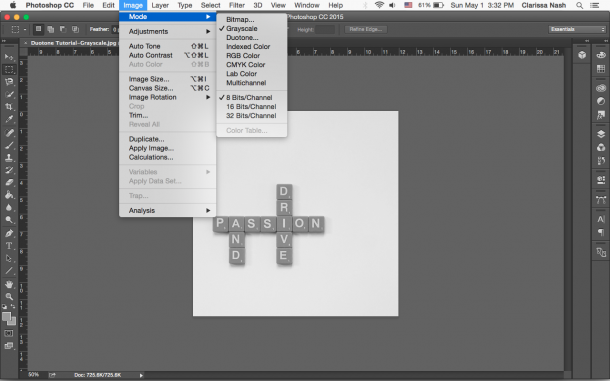
duotone_photoshop_tutorial_step_1-8021259
duotone_photoshop_tutorial_grayscale-5311248

2. Select Duotone using the same pathImage > Mode > Duotone
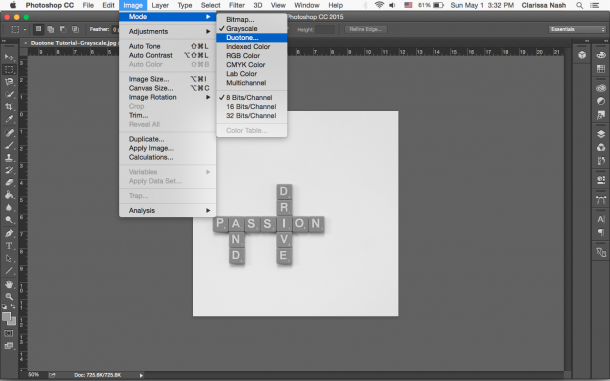
duotone_photoshop_tutorial_step_2-4011753

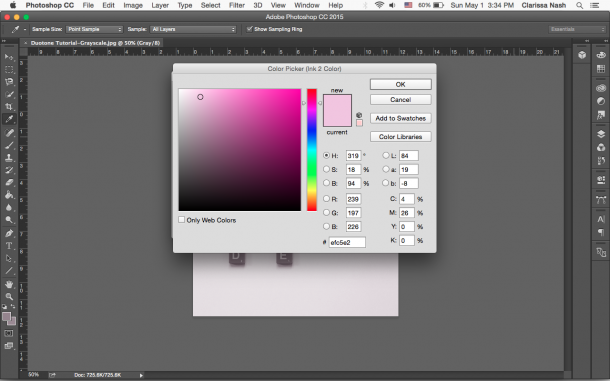
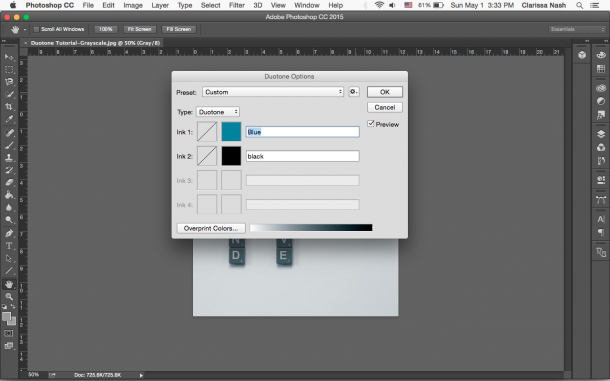
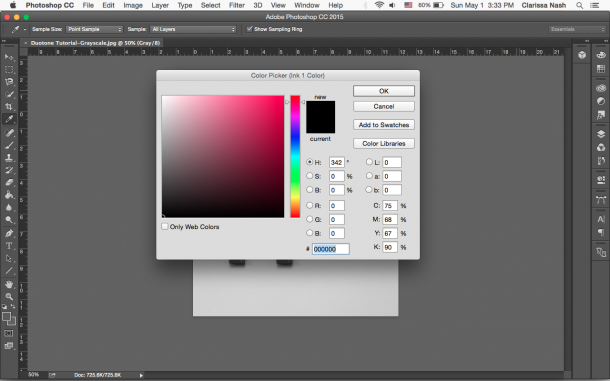
You’ll see a screen pop up with two places to choose your colors. Double click the color swatch and choose whatever color you’d like.
duotone_photoshop_tutorial_step_3-1267679

duotone_photoshop_tutorial_step_4-6245537

duotone_photoshop_tutorial_step_5-9897951

Tip: The first color should be the main color you want to show in the overlay. For example, pink in this example is the main color. If I want to change the pink’s shade, tone, or tint, I’d use a darker color (black), muted/gray-ish color (gray), or lighter color (white). 

(Need help figuring out color combos? Grab my color theory guide here!)

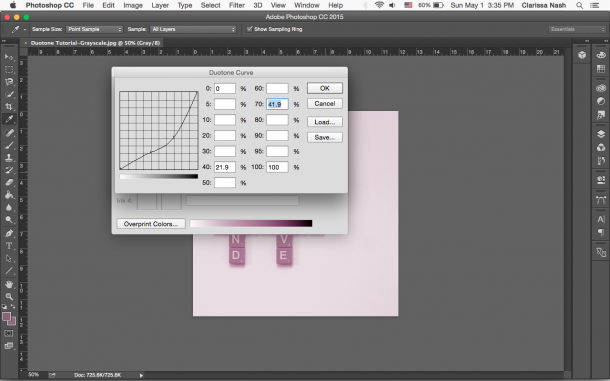
You can also adjust the curves (a way to control an image’s tone). Click the diagonal line. In the pop-up, adjust to make the color lighter or darker.
duotone_photoshop_tutorial_step_7-5557134

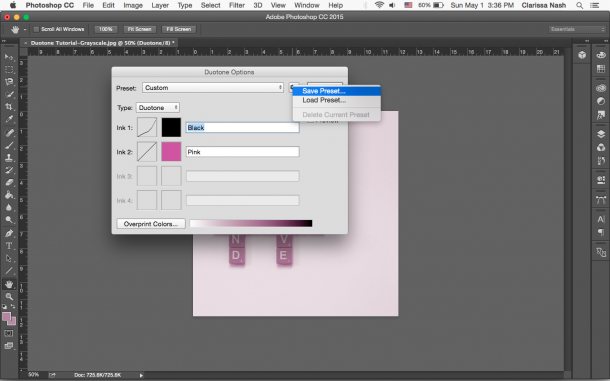
3. Save your preset so you can use it again. 
duotone_photoshop_tutorial_step_8-5276202

Ta-da! You have a duotone image. And it really is a lot simpler than you think. 

duotone_photoshop_tutorial_final-8862608

Interested in more Photoshop tips? Leave me a comment below and let me know what you’re interested in!

Until next time, C

Should Brands Get Political?

Should Brands Get Political?

This post was originally August 23, 2017 after the murder of 32-year-old Heather Heyer. In light of Macklemore being dropped from Ed Sheeran's Loop Tour for speaking out against the Genocide in Gaza, I thought it was important to repost this. Silence is complicit....

Growing at Alt: Five Reasons You Should Go

Growing at Alt: Five Reasons You Should Go

Imagine going to a paradise city where creative people gather for a week to learn from one another. Well, you don’t have to imagine, because that’s what Alt Summit did for me and thousands of others last week. In my second year as a speaker and attendee, I kind of...

3 Reasons to Use Pinterest for Business

3 Reasons to Use Pinterest for Business

In 2009 I started using Pinterest to post everything I loved. It didn't have an order, plan, or strategy. If I liked it, I put it on its appropriate board and kept it moving. But like most mediums, Pinterest transitioned from only personal fun to another piece of...